LightBlog

Bootstrap is an excellent front-end framework, rather an open source project built under  MIT license  using HTML, CSS, and JavaScript in ...

Bootstrap is an excellent front-end framework, rather an open source project built under MIT license using HTML, CSS, and JavaScript in the main. Bootstrap developers receive a superior set of re-usable components, ideal grid structures combined with powerful jQuery plugins to create responsive websites rapidly. The grids in Bootstrap puts the ‘mobile-first’ design, and it is one of the most sought-after projects in Github now. A bootstrap designer can make use of some great tools and editors to customize their web designs in a better way. A list of Bootstrap editors and tools that are capable of offering valuable assistance to Bootstrap developers are included in this article.

LayoutIt

LayoutIt bootstrap tool
Official Website – LayoutIt
It is a drag-and-drop interface builder exclusively developed to suit the purpose of front-end web designing. The base happens to HTML 5, CSS, and JavaScript plugins which any programmer can easily deal with. Without writing any codes programmers can use the drag and drop facility enabled in the LayoutIt.

Pingendo

Pingendo bootstrap tool
Official Website – Pingendo
Pingendo is a superb platform for bootstrap prototyping. It works with iOS, Android, and Linux operating systems. Pingendo functions with HTML and LESS for creating responsive/ bootstrap web pages. Designers can easily customize the codes by clicking right on the objects.

Firebase Hosting

Firebase bootstrap tool
Official Website – Firebase Hosting
Firebase hosting is an ideal space for developing and hosting static websites on a platform itself. Firebase hosting was popularly known as Divshot. It is powered by Google and has a great set of tools to develop android and iOS mobile applications. This platform comes with features having explanatory notes that detail its merits & functionality. Divshot offers paid services only.

Lavish Bootstrap

Lavish bootstrap tool
Official Website – Lavish Bootstrap
Lavish offer developers a unique functionality. Developers can choose the color from any image and alter it in such a way to suit their demands. Lavish functions automatically, and highlights headers, menu, text, and much more in every image. The ways of customization offered by Lavish is super easy as well.

BootUI

BootUI bootstrap tool
Official Website – BootUI
A powerful Bootstrap editor is employed in BootUI to help developers in the creation of responsive web pages. Users get a wide variety of responsive templates on BootUI, and they can even attach their own designs to get it bootstrapped very quickly. The services offered are all economically priced, as well.

Bootply

Bootply bootstrap tool
Official Website – Bootply
The code repository included in Bootply is excellent to work with and it serves an addition to Bootstrap editor and builder. Bootply has impressive drag and drop components that developers will be able to customize as they wish. Bootply also includes wonderful jQuery plugins, micro-libraries, FuelUX and much more. BootPly provides paid as well as free services.

Brix.io

Brix.io bootstrap tool
Official Website – Brix.io
The HTML, CSS, &JS available in Brix.io are most advanced ones, and developers can find templates designed by using Bootstrap 4 and AngularJS in it. The codes are super smooth, efficient, easy to handle and can be edited. Brix.io codes are light-weighted as well. All services offered by Brix.io are paid.

Pinegrow

Pinegrow bootstrap tool
Official Website – Pinegrow
Pinegrow is a bootstrap editor which every developer will fall in love with from the first-time usage onward. It provides developers features like live and multi-page editing, enriched CSS&LESS styling options, and a great stylesheet editor. It works as the finest tool to save programmers time and efforts. Pinegrow is a paid platform.

Jetstrap

Jetstrap bootstrap tool
Official Website – Jetstrap
Jetstrap belongs to the category of paid interface builders. Bootstrap 3 templates are made accessible to everyone with the aid of anywhere cloud services that is applicable for all devices. It offers drag and drop of components and comes with pretty decent editable codes.

Bootstrap Starter Kit

Bootstrap starter kit tools
Official Website – BSKit
The bootstrap starter kit is “professional” in terms of templates they offer. It has an exclusive collection of layouts that can be utilized to build websites that fit in any type of business. Bootstrap starter kit does not offer any free templates to build websites or applications.

Conclusion

Bootstrap developers can also utilize the services offered by tools like PaintstrapBoottheme, Stylebootstrap, Bootstrap-magic, X-Editable and Initializr to create high-end bootstrap interfaces that work on multiple devices other than the editors detailed in the article.

Mobile application development companies implement different strategies for creating applications according to the requirements of clien...

native vs hybrid apps
Mobile application development companies implement different strategies for creating applications according to the requirements of clients. All qualified mobile application developers will have to work with small, medium or big corporate businesses who may come with a specific demand. Therefore they should consider the fundamentals of mobile apps development such as development time, money and indeed the purpose of the client. The method which the developer or the client chooses must meet all these essential requirements. At this point, the making a choice between the native apps development and the hybrid apps development may seem to be a difficult question to crack. Here, let us sought it out with a certain amount of clarity.

Native Apps Development

Native is the conventional way of application development. It centers around a particular mobile operating system. Native apps are developed to work on a dedicated platform by using a definite/basic language:Java for Android and Objective-C or Swift for iOS.

Hybrid Apps Development

Hybrid apps are cross-platform applications that can be used on different platforms like Android or iOS and can be distributed to the app stores in an instant. Technologies utilized for developing hybrid applications are HTML 5, CSS 3 and Javascript. These technologies get converted into the specifications of a native android application or a native iOS application by means of PhoneGap or Cordova. Both PhoneGap and Cordova allows faster conversion by writing less number of codes.
Note:- The new Android permission system calls for additional lines of native codes. Thus, while developing hybrid applications users must go for developers who know Java coding.

Native Apps Development – Merits

Faster Performance

Native applications are developed by tightly following the guidelines of a particular operating system. Therefore, it performs and functions rapidly in comparison to the hybrid ones. Gaming applications are best instances to the point.

Great Interfaces (UI/UX)

The UI/UX standards kept by native applications will be very high. Users will always feel at ease while navigating or dealing with native UI/UX. It stands way ahead of hybrid applications in this aspect.

Complete Access to the in-built Functionality

A native application can easily access the complete functionality offered by the device such as camera, microphone, global positioning system and calendar. Hybrid applications have limited access to these device functionalities.

Superior Reach

The visibility of native applications in the app store is better than the hybrid applications. Therefore native applications grab the attention of users very quickly. The better UX does the trick on most occasions. Native applications easily gain potential clients.

Connectivity

Internet connection is not mandatory for the functioning of native applications, but in most occasions, a hybrid application demands an internet connection for proper functioning.

Hybrid Apps Development – Merits

Needs Only Fewer Resources

By using a PhoneGap wrapper or Cordova, developers get the freedom of using one language for multiple platforms. These technologies reduce the amount of development needs considerably. For instance, developers good at C# do not have to learn Java or objective-C for developing an android or an iOS application, if they know how to deal with Cordova. The platform independence of hybrid applications calls for a limited resource only, and hybrid apps take less development time.

Cost Effective

The cost of developing a hybrid application will be much lesser in comparison to native apps development. Programmers do not have to create separate versions of the same application for functioning on android, iOS or other operating systems.

Native Apps Development – Demerits

Higher Cost

The cost of developing a native application will be higher. A native application comprises of multiple lines of codes that are difficult to maintain as well.

More Resources are Needed

A mobile application development company should keep developers who are experts at specific platforms for developing native applications.

Hybrid Apps Development – Demerits

Look and Feel

Hybrid applications lack the great look and feel of native applications. The UI/UX of native applications is way ahead of hybrid applications

Slow

The performance and efficiency of hybrid applications may not be as fast as native applications.

Question and Answers

Native or Hybrid – Which is the Right Choice?

There is no definite or single word answer to this question. The choice must be made according to your budget and future needs. Let us check out some common circumstances.

When to Go for A Native App?

If you have very good access to skilled developers dedicated to working on a specific platform and have a higher budget for providing users with greater experience, you should blindly go for a native apps development. You can gain high popularity by having a native application which is high on native features like camera, navigation, performance, device buttons, messaging, hardware and overall experience. A native application is the finest of alternatives when you decide to provide users with the best/feature-rich.

When to Go for A Hybrid App?

If you want to launch an application very quickly in the market and gain more users, hybrid apps development will serve you the best. With the assistance of a lesser manpower and cost, you can easily launch a hybrid application. Another circumstance in which a hybrid application comes handy is where users require frequent updates. Applications that display up to date news, changing values, and bank rates need frequent updates. Here, a hybrid application happens to be more useful, for it demands only lesser maintainability and easier updates(at times altering a single line of code will do).

Here is one  meme  that really spoke to me as a designer. It just goes to show how important  typography  and  design  are to communicatin...

Here is one meme that really spoke to me as a designer. It just goes to show how important typography and design are to communicating a message, whether it be spoken or unspoken.
Water Graphic Design Meme
Did you read the two words differently in your head?
Similarly, ever wondered what typefaces best represent democracy, truthfulness, liberty, freedom, quality and independence? I found these survey results interesting.

1. Google Fonts – Update fonts.google.com The well-know Google Fonts site has gone through a fantastic, customizable redesign. ...

1. Google Fonts – Update

Google Fonts
The well-know Google Fonts site has gone through a fantastic, customizable redesign.

2. #ColorOf

ColorOf
An experiment in human interaction & color representation. Select a word and view its most prominent colors shared on Instagram.

3. Lots of Logos

Lots of Logos
A few designers are trying to each design a logo a day for as long as they can. Some really nice concepts.

4. Mile Inn

Mile Inn Collective
A production company collective whose site depicts their unique approach.

5. NIFOS

NIFOS - National Institute of Feline Orbital Studies
With fun animations, the National Institute of Feline Orbital Studies gives numbers for how much it will take to house a cat.

6. Product Design Industry Report 2016

Product Design Industry Report 2016
A nicely constructed report by InVision with strong typography and a restrained yet bold color scheme.

7. Small Victories

Small Victories
Intriguing… quickly turn your files from Dropbox into a website.

8. The Lost Sloth

The Lost Sloth
A quick, playful exercise to try to find the sloth hiding out in the scene.

9. The Official Guide to New York City

top-10nyc
With bold type, photos, shapes and color, this feels about right for NYC.

10. Type Terms

Type Terms

This article lists some of the best practices that would be useful for developers while they are coding with AngularJS. These are out of...

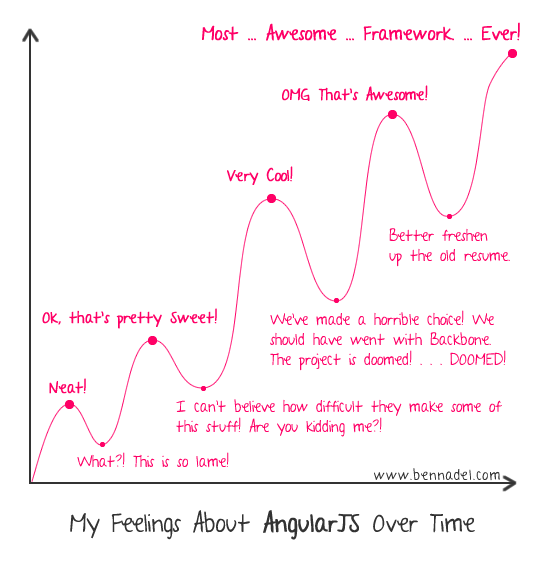
My feelings about AngularJS over time.

This article lists some of the best practices that would be useful for developers while they are coding with AngularJS. These are out of my own experiences while working on AngularJS and do not warranty the entire list. I am sure there can be more to this list and thus, request my readers to suggest/comment such that they could be added to the list below. Found some of the following pages which presents a set of good practices you would want to refer. Thanks to the readers for the valuable contribution.

Initialization

  • One should try and place the <script> tag including the angular.js and related angular scripts at the bottom of the page to improve the app load time. This is because the HTML loading would then not be blocked by loading of angular.js and related scripts.

Expressions

  • Complex javascript code should be made as a method in the controller (added as a method to the $scope) and then, should be called from the view. This is unlike putting the complex Javascript code as Angular expressions, right, in the view.

Controllers

  • With real applications, one should avoid creating controllers in the global scope. Rather, one should use “.controller” method of the Angular Module to work with $scope object. Take a look at the sample code below illustrating this point:
Controller defined in the Global Scope:
function HelloController( $scope ) {
$scope.name = "Guest";
}
Controller defined using “.controller” method (Recommended way)
var helloApp = angular.module( "helloApp", [] );
helloApp.controller( "HelloController", function($scope){
$scope.name = "Guest";
} );
  • The controllers should only be used to setup initial state of the $scope object and add one or more behaviour to this object. One should avoid using controllers to do some of the following:
    • Manipulate DOM, 
    • Format input, 
    • Filter output, 
    • Share code or state across different controllers
    • Manage the life-cycle of other components (for example, to create service instances)
  • A controller should contain only the business logic needed for a single view. The functionality should rather be moved to services and these services should be injected into the controllers using dependency injection.
  • The recommended way to declare the controller function is to use the array notation such as following because it protects against minification.
Controller instantiation without array notation
var helloApp = angular.module( "helloApp", [] );
helloApp.controller( "HelloController", function($scope){
$scope.name = "Guest";
} );
Controller instantiation with array notation (Recommended way)
var helloApp = angular.module( "helloApp", [] );
helloApp.controller( "HelloController", ['$scope', function($scope){
$scope.name = "Guest";
}]);
  • While writing unit tests for controllers, one of the recommended ways is to inject $rootScope & $controller. Take a look at the sample unit tests on this page: http://hello-angularjs.appspot.com/angularjs-unit-test-code-example-1. The following is the sample code representing injection of $rootScope and $controller objects.
    beforeEach(
    inject(
    function( $rootScope, $controller ){
    scopeMock = $rootScope.$new();
    $controller( 'CompanyCtrl', {$scope: scopeMock} );
    }
    )
    );

Directives

  • One should prefer using the dash-delimited format (e.g. ng-model for ngModel). While working with an HTML validating tool, one could instead use the data-prefixed version (e.g. data-ng-model for ngModel).
  • Prefer using directives via tag name and attributes over comment and class names. Doing so generally makes it easier to determine what directives a given element matches.
  • While creating directives, it is recommended to prefix your own directive names to avoid collisions with future standard.

Template

  • With large templates (HTML content with Angular directives) within an HTML file, it is recommended to break it apart into its own HTML file and load it with the templateUrl option.

Dependency Injection

The preferred way of injecting the dependencies is by passing the dependency to the constructor function rather than using one of the following other ways. In this way, the responsibility of creating the dependency object lies with other objects or function. This is straight forward for those who have worked with one or more dependency injection framework in the past. However, this could be useful information for the beginners. Following are other ways of doing dependency injection in Angular:
  • Create it using the new operator.
  • Look for it in a well-known place, also known as a global singleton.
  • Ask a registry (also known as service registry) for it.

Unit Testing

  • As mentioned above, one should try and avoid using controller methods for DOM manipulation. That would bring views code inside the methods and make it difficult to test.
  • One may want to use Jasmine/Karma combination for doing controller methods testing.
  • Protractor framework can be used for E2E testing, as recommended. Read more on Angular page for E2E testing.